Post Formats
There are many ways to effectively and compellingly convey information online, from traditional web articles to infographics and social media campaigns. When choosing your post format, please keep in mind the following things:
- Challenge Yourself. Look for something new that you can learn, or take an existing skill to the next level.
- Know Yourself. Choose a post format that you can reasonably expect to complete in the limited time given. If you are completely new to creating live video, for example, you might not have enough time in class to plan, shoot, and edit your project.
- Know Your Requirements. Pay close attention to the requirements for the post format you choose, and make sure that you know what you’re getting into.
- Give Yourself Room to Experiment. Choose a post format that enables you to experiment and change course if things don’t end up the way you’d like.
Web Article

Web articles are the perfect format for writers, and are one of the most popular ways of conveying information online. A Research Project web article should have the following components:
At least three detailed paragraphs
- Paragraph One: What?. This paragraph should explain what your topic is about to someone who is not familiar with it.
- Paragraph Two: So What? This paragraph should detail why someone would want to learn about this topic.
- Paragraph Three: Now What? This paragraph should provide resources for further exploration of your topic, and, if applicable, let them know what they can do to address the issues that you’ve brought up in the previous paragraphs.
If desired, you may add additional paragraphs that expand upon the What, So What, Now What structure. Want to deviate from this structure? Talk with your teacher, as well-reasoned alterations are possible.
One featured image
This graphic will be large and at the top of your article. It can be from another source if you are able to attribute the creator, or it can be a graphic that you created yourself.
At least one additional embedded media element
Incorporate at least one other media element (graphic, video, audio, etc.) somewhere within or at the end of your article. It can be from another source if you are able to attribute the creator, or it can be a graphic that you created yourself.
At least four sources cited in MLA format, and properly-attributed media elements
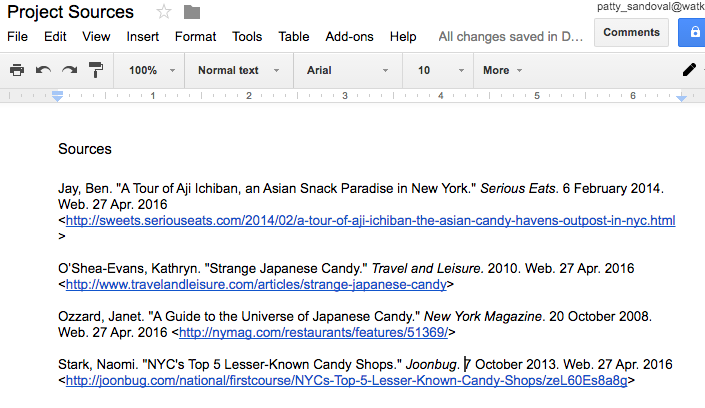
At the end of your post there will be a Sources section that will contain all of the high-quality sources you have used to research your topic in MLA format (see an example). Please be sure to provide proper attribution to all non-original media that you include (see an example).

ALTERNATIVE OPTION: ADOBE SPARK PAGE ARTICLE
Instead of a regular web article you can create an Adobe Spark Page that contains the paragraphs detailed above, as well as at least two media elements (graphics, videos, audio, etc.), one of which must be visual. Put a link to your page in Heading 1 format with your sources below it and add appropriate tags and categories as necessary.
Frequently Asked Questions (FAQ)

A list of frequently asked questions can help get people up-to-speed about your topic quickly in an intuitive, easy-to-read format. A Research Project FAQ should have the following components:
At least 6 questions and answers
Questions should be brief, clear, and represent a common question that someone unfamiliar with the topic might ask. Answers should provide a detailed answer to the question, and may include links to further information or graphic elements.
One featured image
This graphic will be large and at the top of your article. It can be from another source if you are able to attribute the creator, or it can be a graphic that you created yourself.
At least one additional embedded media element
Incorporate at least one other media element (graphic, video, audio, etc.) somewhere within or at the end of your article. It can be from another source if you are able to attribute the creator, or it can be a graphic that you created yourself.
At least four sources cited in MLA format, and properly-attributed media elements.
At the end of your post there will be a Sources section that will contain all of the high-quality sources you have used to research your topic in MLA format (see an example). Please be sure to provide proper attribution to all non-original media that you include (see an example).
ALTERNATIVE OPTION: ADOBE SPARK PAGE FAQ
Instead of a regular FAQ you can create an Adobe Spark Page that contains the FAQ as detailed above, as well as at least two media elements (graphics, videos, audio, etc.), one of which must be visual. Put a link to your FAQ in Heading 1 format with your sources below it and add appropriate tags and categories as necessary.
How-to

How-to posts provide detailed instructions to help people accomplish a specific task. A Research Project how-to should have the following components:
A complete, numbered, step-by-step set of instructions for completing a task that relates to your topic
Visuals should be included for each step (either still images or incorporated within a screencast). Instructions should include enough information to complete a single step. Length depends on the number of steps required to complete the task, but the task should be complex enough to require at least 4 steps.
One featured image
This graphic will be large and at the top of your article. It can be from another source if you are able to attribute the creator, or it can be a graphic that you created yourself.
At least four sources cited in MLA format, and properly-attributed media elements.
At the end of your post there will be a Sources section that will contain all of the high-quality sources you have used to research your topic in MLA format (see an example). Please be sure to provide proper attribution to all non-original media that you include (see an example).
Infographic

Infographics are great opportunities for artists and graphic designers to harness the power of visuals to convey information. A Research Project infographic should have the following components:
A dataset
You must base your infographic upon data, which might include statistics, demographics, or survey results about your topic.
A “template” infographic that closely resembles the one you’re attempting to create.
You can use a service like Canva to find ready-made templates, or search for great infographics that you can use as inspiration.
A clear message
What do you want to convey to the people who view your infographic? A surprising statistic? An overview of your topic? A visual explanation of a topic with many components? The graphic you build will need to have a clear focus. If you’re looking for help with your focus, consider using the same ”What, So What, Now What” structure that the web article project uses.
Concision
Be sure to limit your scope and graphic size to something that you can manage in the time provided. Keeping things concise will also help the people who view your infographic understand your topic more quickly.
No long sentences or paragraphs
Infographics should avoid long text passages. If you find that your topic requires writing large amounts of text to explain, please consider switching to a text-based format.
At least four sources cited in MLA format, and properly-attributed media elements.
At the end of your post there will be a Sources section that will contain all of the high-quality sources you have used to research your topic in MLA format (see an example). Please be sure to provide proper attribution to all non-original media that you include (see an example).
Infographic Creation Tools
Be sure to select the free versions of these products, and use Watkinson information instead of revealing your personal data.
Podcast

Audio-only podcasts are excellent ways to get personal with the people who visit your project online — there’s a greater connection with the human voice, and in these projects your unique personality can shine through. A Research Project podcast should have the following components:
Length between 3 and 5 minutes
Try some rehearsal runs before you record to make sure that you’re staying within the time limit.
A base script or topic outline
Written notes or a script (contained within a properly-shared Google Doc) can provide your podcast with a structure, and helps your visitors stay focused on your topic without the visual elements they’re used to seeing online.
A “What, So What, Now What” structure
In your podcast, make sure you explain:
- What? How would you explain the basics of your topic to someone that is not familiar with it?
- So What? Why is this topic important? Why should a visitor to your topic spend the time to learn about it?
- Now What? What can they do to address the things you bring up? Where can they find high-quality information if they want to learn more?
A clear format
Your podcast can be a monologue, where you are the only one talking, a conversation with someone else, or an interview where you ask someone questions about your topic. It can also combine these formats if desired. Just be sure you know how you’re going to structure and format your content.
At least four sources cited in MLA format, and properly-attributed media elements.
At the end of your post there will be a Sources section that will contain all of the high-quality sources you have used to research your topic in MLA format (see an example). At the end of your podcast, please be sure to give credit to the creators of all non-original media (music, sound effects, etc.) that you include.
Screencast

A screencast is a narrated recording of what’s being displayed your computer screen, which in this case will be a Google Slides presentation. Screencasts provide a powerful combination of strong visuals along with the personal touch of your voice. A Research Project screencast should have the following components:
Length between 3 and 5 minutes
Try some rehearsal runs before you record to make sure that you’re staying within the time limit.
A Google Slides presentation
Please create the presentation you will narrate in Google Slides so that they can be reviewed and commented upon.
Compelling visuals, few words
Please don’t ask your viewers to read a lot of text! Use your narration to convey information, and use the slides to support and punctuate what you’re saying. Avoid bulleted lists and try to use creative images to convey your ideas.
A base script or topic outline
Written notes or a script can provide your screencast with a structure, and helps your visitors stay focused on your topic.
A “What, So What, Now What” structure
In your screencast, make sure you explain:
- What? How would you explain the basics of your topic to someone that is not familiar with it?
- So What? Why is this topic important? Why should a visitor to your topic spend the time to learn about it?
- Now What? What can they do to address the things you bring up? Where can they find high-quality information if they want to learn more?
At least four sources cited in MLA format, and properly-attributed media elements.
At the end of your post there will be a Sources section that will contain all of the high-quality sources you have used to research your topic in MLA format (see an example). At the end of your screencast, please be sure to include a slide giving credit to the creators of all non-original media (photos, music, etc.) that you include.
ALTERNATIVE OPTION #1: MY SIMPLESHOW
You may use the web video service My SimpleShow to create a video instead of creating a screencast. Content requirements remain similar, please ask your teacher if you’d like to give this option a try.
ALTERNATIVE OPTION #2: ADOBE SPARK VIDEO
Instead of a regular screencast you can create an Adobe Spark Video. Content requirements remain similar, please ask your teacher if you’d like to give this option a try.
Webcomics
Webcomics are a wonderful and creative way to express ideas. Each panel is presented in a sequence that helps inform and entertain your audience. A Research Project webcomic should have the following components:
Webcomic Panels
Choose from the provider list below (be sure to use free versions, and try several to see what works best for you), or create your own.
A “What, So What, Now What” structure
In your comic, make sure you explain:
- What? How would you explain the basics of your topic to someone that is not familiar with it?
- So What? Why is this topic important? Why should a visitor to your topic spend the time to learn about it?
- Now What? What can they do to address the things you bring up? Where can they find high-quality information if they want to learn more
At least four sources cited in MLA format, and properly-attributed media elements.
At the end of your post, after the comic panels, there will be a Sources section that will contain all of the high-quality sources you have used to research your topic in MLA format (see an example). At the end of your screencast, please be sure to include a slide giving credit to the creators of all non-original media (photos, music, etc.) that you include.
Webcomic Creation Tools
Special Post Formats

If you would like to try creating a post in a format that is not listed above, it may still be available as a choice — please speak to your teacher about your idea and how you feel it can be completed in the time we have. Please note that some of these formats require demonstration of prior work before acceptance because of the limited time available to work on projects in class, and may have earlier deadlines.
Special projects may include, but aren’t limited to:
- Animation
- Interactive Media
- Live-action Video
- Video Games
- Web sites