Leadership Roles
GO TO ROLE CALENDARWe all share responsibility in creating the right environment to learn and enjoy our time with one another. We also want to be able to document the work that we do, as well as find ways to extend our learning about the topics we cover.
To that end, we have three leadership roles that students are asked to fill during the trimester. To earn your Leadership Badge, you’ll need to fulfill a leadership role at least three times during the course of the class. Please request your roles early so that you are more likely to get the role(s) you prefer.
How do I figure out what roles I want and then ask for them?
- Review the description of leadership roles below.
- Determine which of the three roles you want to do in order to earn your badge (or level-up once you’ve earned it). You can fulfill any combination of roles, but please note that there are restrictions for the Photographer role as described below.
- Use the Leadership Role Request Form to request your desired roles.
What happens next?
You will be scheduled into available slots as shown below. You’ll be responsible for fulfilling the Photographer and Reporter role(s) within one week of your scheduled day. If you don’t, you’ll need to try again with another available role.
Class Photographer

The Class Photographer is responsible for taking photographs of students working during class. Photographs will be posted on the Learning Blog’s entry for the day along with the description written by the Class Reporter.
When you are the Class Photographer…
- Get a camera from your teacher.
- Make sure you know how to use it.
- During class, take one or more good photographs of your classmates.
- Choose one photograph to feature for the day, and either delete the others or let your teacher know which one you’d prefer.
- Return the camera by the end of class.
Guidelines for Photographers
Your photos should:
- Be horizontal (portrait), not vertical
- Feature students, not the teacher or board
- Be flattering, not embarrassing — no ambushes!
- Be interesting — feel free to get up, try different angles, & capture “action”
What happens next?
Your teacher will review your choice. You will get credit toward your Leadership Badge only if your photograph is accepted and posted with the Class Report for the day. Otherwise, you will receive an explanation of why your photograph was not accepted and be asked to try again on another day.
Restrictions
You can only be class photographer twice, pending availability: once while earning your badge, and a second time to help level-up your badge after it’s been earned.
Class Reporter
 CLASS REPORT TEMPLATE
The Class Reporter is responsible for writing down what happens during class, including the topics we cover and the things we discuss. Then, the reporter takes this information and uses it to create a new post on our class blog.
When you are the Class Reporter…
- Make a copy of the Class Report Template Google Doc.
- Type your report where indicated, using the guidelines provided.
- Copy and paste your report (below the instructions) into a new blog post on our Learning Blog.
- For tags, enter any relevant keywords for the day’s work. Note that tags are optional.
- For category, please choose “Class Reports”.
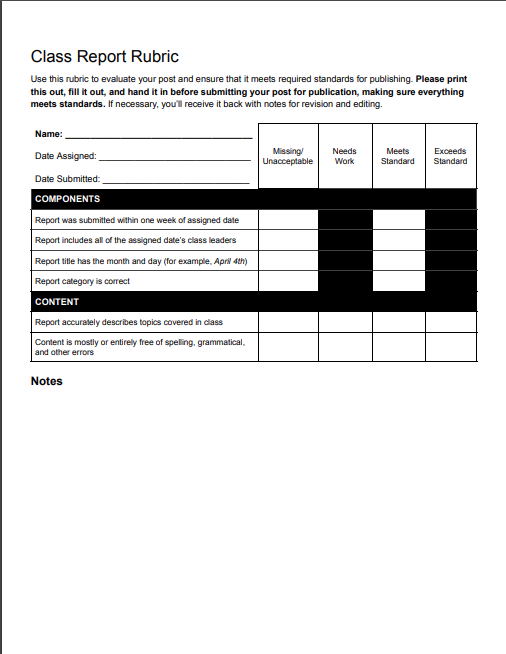
- Fill out and submit the Class Report Rubric within one week of the assigned day.
- Submit your post for review within one week of the assigned day. You can use start-of-class time to compose and submit your work.
The Class Report Rubric
Please use this rubric to make sure you meet all standards for publication of your class report.
Guidelines for Reporters
- Your report serves two purposes: to track what happens in class, and to provide a description for posting on our class web site.
- In your notes, please answer the following questions:
- What topic(s) did we cover during class?
- What would someone who was absent today need to know?
- Did anything else fun or interesting occur? If so, what? Who was involved?
- The final report should be well written, with no grammatical or spelling errors, and should include links when available.
- Copy and paste your notes into the blog post, removing the help text at the top.
Example Class Report (using an unrelated topic):
Today in class we studied how to create effective slide presentations. Everyone has used PowerPoint, Keynote, Google Slides, or something similar to present information to others, and it’s an important skill that will be necessary for the rest of our academic and professional lives.
We talked about some of the problems with bad presentations, and determined that they include audience distraction, lack of engagement, and potential confusion. A bad presentation also can give an audience a negative impression of the presenter.
[Another Example Class Report]
![[Another Example Class Report]](images/reporter-example.png)
What happens next?
Your report will be reviewed and paired with the Class Photograph for the day. If your report does not meet the requirements described above, you will be asked to edit it. Once approved, you will receive credit toward your Leadership Badge when the report is posted on our Learning Blog.
Class Explorer

The Class Explorer is responsible for composing and submitting a brief post to our Learning Blog that features content which extends our learning about Digital Citizenship and the lives we lead online beyond what we’ve covered in class.
When you are a Class Explorer…
- Use your search skills to find an interesting, informative article, video, or other online content that relates in some way to our class topics or our online lives.
- Compose a brief blog post describing the content, including a text hyperlink to it or a direct video embed. Wordpress allows pasting of YouTube URL’s directly in a post, while hyperlinks should be descriptive text and not the URL itself. Example: Watkinson School, not [http://watkinson.org].
- Create and upload a featured graphic (you can use Pablo, Canva, or another source).
- Add relevant tags (keywords that relate to your content).
- Choose the “Explorations” category.
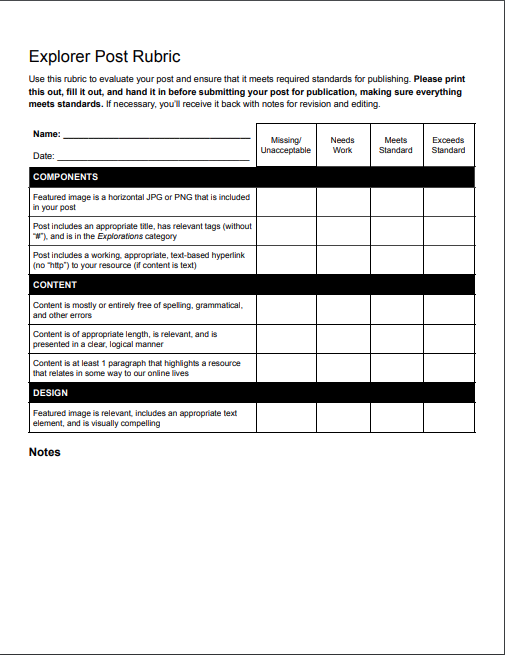
- Fill out and submit the Explorer Post Rubric.
- Use the Pre-Publishing Checklist to make sure everything is ready, then submit the post for review.
![[Example Explorer Post]](images/explorer-example.png)
The Class Explorer Rubric
Please use this rubric to make sure you meet all standards for publication of your Explorer post.
Guidelines for Explorers
- Choose a topic that you find interesting. Chances are good that if you find it interesting, the rest of us will, too.
- Keep it simple. You don’t need more than one paragraph for this, as the purpose of the post is to entice us to learn more by clicking on the link you’re providing
- Keep it relevant. Make sure it connects in some way to what we’re discussing in class or our online lives in some way. If you’re stuck, remember our Essential Question: “What are the rights, responsibilities, and challenges of being an online citizen?”
What happens next?
Your post will be reviewed and either posted to the Learning Blog, or you receive a request for edits via email. Once approved, you will receive credit toward your Leadership Badge when the report is posted on our Learning Blog.
Role Assignment Calendar
Please check below to see when you are assigned to a Leadership Role. Roles will also be posted on the beginning-of-class slide. Please note that absences, delays, and cancellations may require modifications to assignments.